Showing posts with label you tube. Show all posts

Wednesday, 28 January 2009

Using You Tube Offline


Sept  2012
Zamzar can no longer be used   to download You tube  videos  and I can no longer work out how to use  You Tube off line: NO clear instructions

Sometimes it is not possible to use You Tube in the classroom. The site may be blocked or the video can freeze or be very slow.
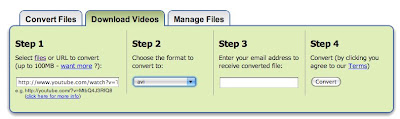
To get over this you can view videos offline by using a web site that will convert and allow you to download the video.
You Tube off line works very well if you use Quick Time or I Tunes to view videos as it produces a file in MP4 format . If you want to use Windows Media Player then use another website called Zamzar and when selecting the file format choose to convert to avi . When using Zamzar don't expect to download and use immediately as a link is emailed to you and then the file has to be downloaded on to your computer.
Sept  2012

Zamzar can no longer be used   to download You tube  videos
Free Technology for Teachers has a blog entry about a website Convert my You Tube but I have found this only produces an audio track not a video.
The
Becta forum also has some other suggestions .

Sunday, 28 September 2008

Trying out the Easy You Tube

I save lots of my links to delicious and I have been able to use a tag called Obama+playlist to try out the Easy You Tube .Easy You Tube is an accessible version of You Tube . You can read about it on the BBC Ouch! blog and


is made using my tag in delicious .
I have copied the tag into a URL. I think this is the most effective way of providing a list for the Easy You Tube which is accessible to adults with learning difficulties.
There are instructions on how to do this in the Easy You Tube documentation section.
I had to change the URL address slightly tag=mainbanana-obama%2Bplaylist
Well done to the developer Chris Heilmann.
nb : needs Java Script which may not be available at college.

Friday, 5 September 2008

Hello songs

The Becta SLD forum recently had a useful thread about suggestions for Hello Songs.
To the tune of 'nice one Cyril'?

Hello Debbie,
Hello Debbie,Hello Debbie,
How are you today?

"Happy Birthday to you"
The "Happy Birthday to you" song is possibly the most popularly sung song in the whole world, and was adapted from a song originally entitled (and worded) "Good morning to all", which was written in 1893 by two kindergarten school teachers in America for precisely the purpose of greeting children in the morning.

From the movie
I'm singing in the rain- Good morning!

Good morning
Good morning
It's nice to see you here
Good morning,
good morning to you.

There are two suggestions for products to buy:

Connections by Jessica Curry( £41.00 a copy ) has been suggested as having age appropriate songs

Respect
"In October Alison Burns will be publishing "Respect", a songbook (with CD) of new songs for secondary age students with special needs. It's been tried out with great success at a school in Scotland and includes "Hi 5, I'm OK" which is a singaround hello song. The songbook contains Signalong signs for the songs and will be launched at the
Signalong stand at Special Needs London on 17th October. Mike Kennard Signalong."

Tuesday, 19 August 2008

More from the makers of Shape up

If you liked Shape Up (mentioned in my blog on healthy eating) you might like to look at some other DVDs that Somerset Work Preparation Services has on offer:
Germ Academy,a film about Food Safety is 23 minutes long and can be previewed on
You Tube (not the full version ).


They also have a DVD called Listen to Us which consists of 4 short films
We all need friends
We all need a break
Listen to us
I want to complain .
The ones with a live link can be viewed on You Tube .
All the DVDs are £10.00 plus vat and p&p from Debbie Lee .Email: DXLee@somerset.gov.uk

Monday, 26 May 2008

How to include a deaf student in an IT music session.

I like to show my students with learning difficulties (Milestone 8 - Entry 1) how to access music on the computer . They can take these skills and use them at home .This year I had to think about how I could do this as I had a deaf student in the group.

The class started by listening to a CD using the Windows Media Player.


They loaded the CD


Identified the Windows Media icon


Learnt how to plug in the headphones


Used the volume control

My deaf student joined in (the communicator had the headphones!) and used an enhanced audio CD.I chose

Nizlopi : The JCB Song Video animation.


While the others continued to listen to their CD she then viewed


which I had saved on my memory stick.This is a signed performance by David Armand at an Amnesty International event. Its good fun and includes BSL and a few made up signs, not suitable for all students as some of them are a little crude. Judge for yourself by viewing it on You Tube or through handlinger.blogspot.com

If you like it you can buy the Amnesty International DVD - Secret Policeman's Ball Amnesty 2006 .I've seen it for sale new and used on on Amazon .


My students then went on to explore music on the Internet and we looked at You Tube but you might have your own favourites.My deaf student watched videos performed by Bengee143:


Viewing music on the Internet has many pitfalls, so make sure you try out all your ideas in the classroom first and have some standby music from another source. Two problems to look out for are:
1.Buffering - the video freezes and will only play intermittently.
2. You Tube can appear in skeleton form only,the second time you use it. Apparently it does this to encourage you to sign up.

Good luck and don't forget to check if your computers have sound cards!